
FAQ / Top questions / How do I enter passenger information during reservation?
How do I enter passenger information during reservation?
During reservation, you need to enter data from a document, which you are going to use to take a flight (international passport, internal passport, etc.).
- If you have an international passport, the last and the first name entered into the corresponding fields have to coincide with those specified in the document.
- If you only have an internal passport, the last and the first name need to be entered in accordance with the rules of transliteration. We suggest using special transliteration websites that translate Cyrillic letters into Latin ones.
- Letters in the series of an internal passport are entered in the “Document no.” field using Latin letters. If there is a letter for which there isn't a similar letter in the Latin alphabet, use the one that sounds similarly.
- Roman numbers and symbol “№” are entered using the Latin alphabet (№=N).
- When booking internal Aeroflot flights within Russia, you need to enter your patronymic (if you have one) along with your first and last name. The field “Patronymic” is filled out in accordance with the rules of transliteration.
- The fields for the first and the last name are intended for 60 characters only. Characters that exceed the limit will be automatically erased. The minimum number of characters is two. If you filled out passenger's profile earlier, you may upload passenger's information from "My account":
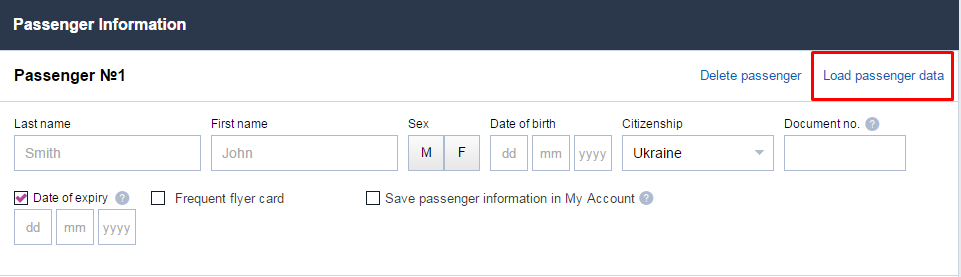
For more about passenger's profile, refer here.
Mandatory information:
- Email. Attention! In the "email" field, trip organizer's email address must be specified. It is his or she to whom the e-ticket will be sent.
- First and last name of the customer (trip organizer).
- Cell phone of the customer (trip organizer).
Please be careful when you enter information. After booking, passenger's information is impossible to change!
Customer information will be automatically entered upon login and will be impossible to change.